|
| |
Forum Tips
» This forum is for users to discuss their software problems and suggestions for improvement.
Remember that only a tiny percentage of our users experience such problems (To be precise less than 0.7% have ever posted on this forum)
» Include your software version number (as displayed in the About Box)
» Check the FAQ before posting as most common questions have already been answered
» You don't need to also e-mail us separately as our support team will respond to all questions on this forum
|
|
| Author |
 Topic Topic  |
|
|
bmccall

USA
23 Posts |
Posted - Feb 17 2012 : 04:08:10


|
I see from the forum that it was suggested in 2005 that you make your slide shows so that they could be embedded in html and placed on websites. Have you given that any thought or implimented it?
Thanks!
Ben |
|
|
xequte

7504 Posts |
Posted - Feb 17 2012 : 12:13:44
|
Hi Ben
We decided not to implement this functionality into DVD PixPlay, as we believe it provides more functionality (motion effects, audio accompaniment, etc) if you use the option to create a YouTube video. You can then embed that into your web page.
If you would prefer an HTML based solution then take a look at one of our image management products such as Smart Pix or MegaView which can created themed HTML image slideshows.
Nigel
Xequte Software
www.xequte.com
nigel@xequte.com
|
 |
|
|
bmccall
USA
23 Posts |
Posted - Feb 18 2012 : 03:52:02
|
I would like to be able to produce a slide show like this one:
http://www.statesvillecountryclub.com/albums/mem-guest/mem-guest1.htm
with auto-playing, auto-replay, and pause, play, forward, and backward buttons. I would like it to be approximately the same size as the one above so that it can be placed in an iframe. This one is ideal except for the fact that it is difficult to teach someone how to set up.
I tried smartpix and megaview and could not get anything close to that. Is it possible to reproduce the above slide show? I assume that the activation of active-x is also required every time someone looks at the slide show.
Thanks!
Ben
' |
|
|
|
xequte
7504 Posts |
Posted - Feb 19 2012 : 15:02:01
|
Hi Ben
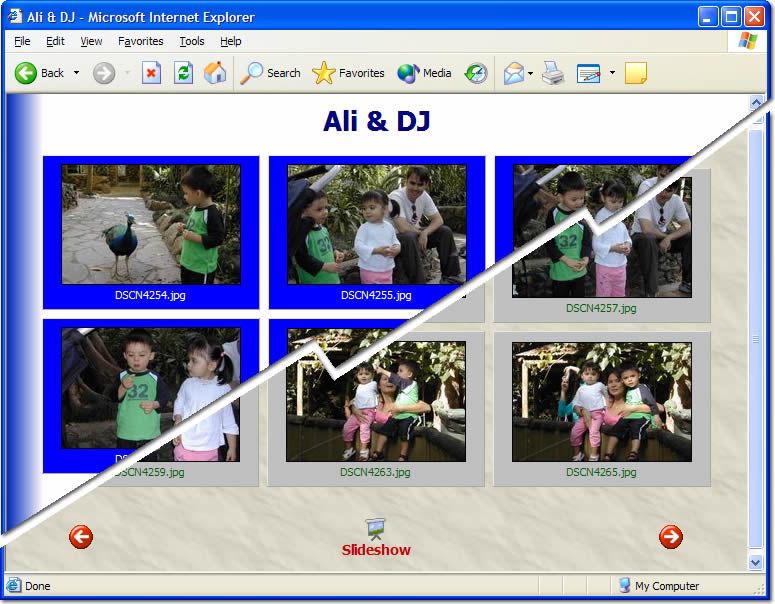
The Smart Pix/MegaView slideshows support thumbnail indexes, forward, back, autoplay and zooming (all using Javascript) and IMHO look much better than the one you referenced.
I'm afraid we don't have any other products for this.
Nigel
Xequte Software
www.xequte.com
nigel@xequte.com
|
|
|
|
bmccall
USA
23 Posts |
Posted - Feb 19 2012 : 15:21:13
|
I have no interest in the thumbnails. Do you have any demos of the slide show alone with auto play, auto replay, forward, and backward or a help file that explains how to accomplish that? Is it also possible to place descriptive labels on eack file?
Thanks!
Ben |
|
|
|
xequte
7504 Posts |
|
|
bmccall
USA
23 Posts |
Posted - Feb 20 2012 : 03:55:24
|
I read the help file that you referred me to. It states that the wizard is only with the registered version. I have already downloaded and tried both smartpix and megaview but it appears that it is impossible to setup a slide show as one wants without purchasing the programs. Is that correct? I did not see that mentioned anywhere on your routine web page. I have wasted several hours trying to customize a slide show when that option was not available.
Is that correct? I think I would like the product if there was come way to customize the look of the slide show page.
I have been using dvd pixplay for several years and am quite happy wih it.
Let me know if there is any solution except purchasing the product!
Ben |
|
|
|
xequte
7504 Posts |
Posted - Feb 20 2012 : 11:53:17
|
Hi Ben
Sorry i did not realize that limitation was still imposed. Please email me directly.
Nigel
Xequte Software
www.xequte.com
nigel@xequte.com
|
|
|
| |
Topic |
|
|
|
| |

 Search


 internet slide show
