|
| |
Forum Tips
» This forum is for users to discuss their software problems and suggestions for improvement.
Remember that only a tiny percentage of our users experience such problems (To be precise less than 0.7% have ever posted on this forum)
» Include your software version number (as displayed in the About Box)
» Check the FAQ before posting as most common questions have already been answered
» You don't need to also e-mail us separately as our support team will respond to all questions on this forum
|
|
|
Note: You must be registered in order to post a reply.
|
| T O P I C R E V I E W |
| xequte |
Posted - Mar 10 2011 : 20:39:15
Hi
We have just released v6.30 which adds a number of small improvements to enhance your slideshow building experience.
Top Five Enhancements
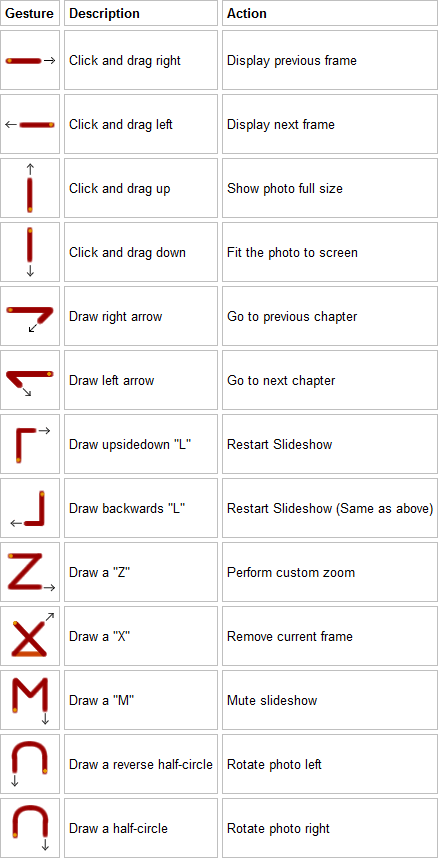
1. Gesture support: Click and drag the mouse to navigate, rotate, remove, etc.
2. Double-sized thumbnails option

3. Now converts MT2S/MTS files
4. Autoplay supported even on Windows 7 and Vista
5. Now automatically switches widescreen DVS menus to 4:3 if it will exceed the widescreen DVD button limit of 12
Complete change list: http://www.xequte.com/pixplay/changes.html
You can download v6.30 from:
http://www.xequte.com/pixplay/download.html
Upgrade Information
V6.30 is a free upgrade to all registered v6.* users. Install it over your current version (without uninstalling first). You will not need to enter your serial number.
If you need to upgrade from an earlier version please visit:
http://www.xequte.com/pixplay/upgrade.html
Nigel
Xequte Software
www.xequte.com
nigel@xequte.com
|
|
|
| |

 Search


