|
| |
Forum Tips
» This forum is for users to discuss their software problems and suggestions for improvement.
Remember that only a tiny percentage of our users experience such problems (To be precise less than 0.7% have ever posted on this forum)
» Include your software version number (as displayed in the About Box)
» Check the FAQ before posting as most common questions have already been answered
» You don't need to also e-mail us separately as our support team will respond to all questions on this forum
|
|
|
Note: You must be registered in order to post a reply.
|
| T O P I C R E V I E W |
| xequte |
Posted - Jun 18 2009 : 14:39:21
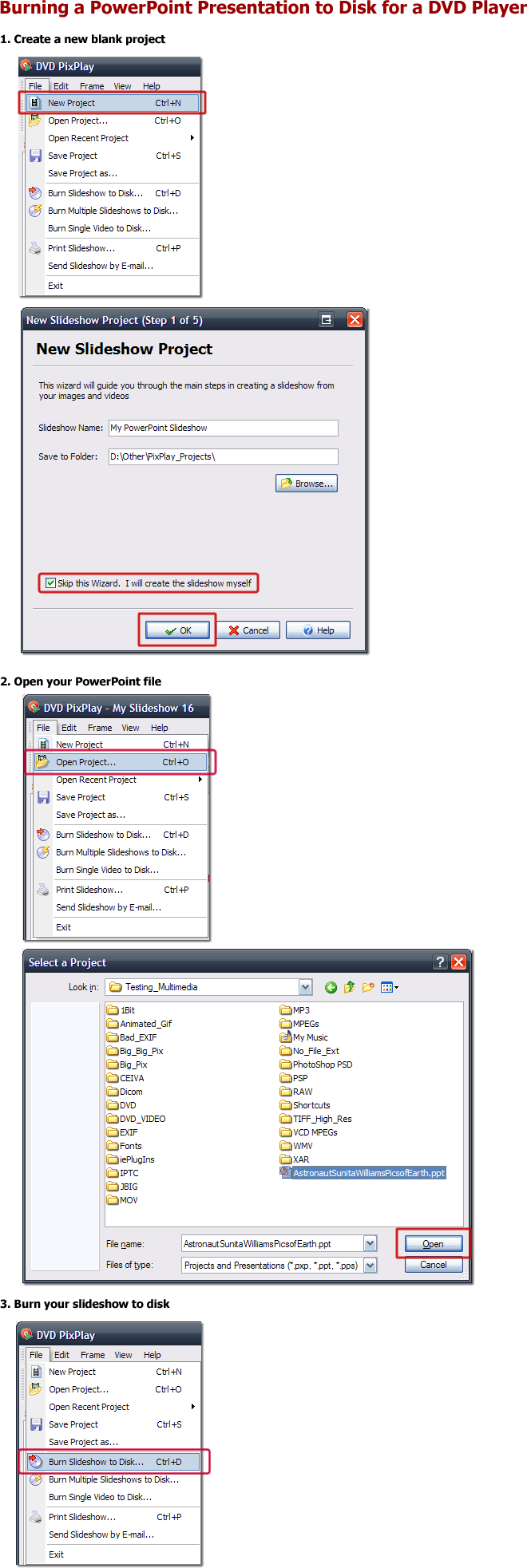
As requested, here is a short outline on using DVD PixPlay Professional (http://www.xequte.com/pixplay/) to burn a PowerPoint presentation to a disk so it can be played in a DVD player:
Nigel
Xequte Software
www.xequte.com
nigel@xequte.com
|
| 3 L A T E S T R E P L I E S (Newest First) |
| xequte |
Posted - Oct 29 2009 : 00:07:36
Hi
DVD PixPlay is compatible with whatever version of PowerPoint is installed on the computer, i.e. if you have PowerPoint 2003 installed then PixPlay can import PPT 2003 and older files.
Nigel
Xequte Software
www.xequte.com
nigel@xequte.com
|
| Asuare |
Posted - Oct 27 2009 : 00:59:26
Hi Chris
I have prepared my PowerPoints with timings set to the music.
Will this carry through, as is, please. |
| Asuare |
Posted - Oct 27 2009 : 00:52:43
I have both PowerPoint 97-23 & 2003 is either compatible please. |
|
|
| |

 Search


